3.18.2013

Start Module Implement Yourself

RobotChallange 2013 ordered Start Modules for Robot Sumo, which we can just buy for 15 EUR or implement ourselves.

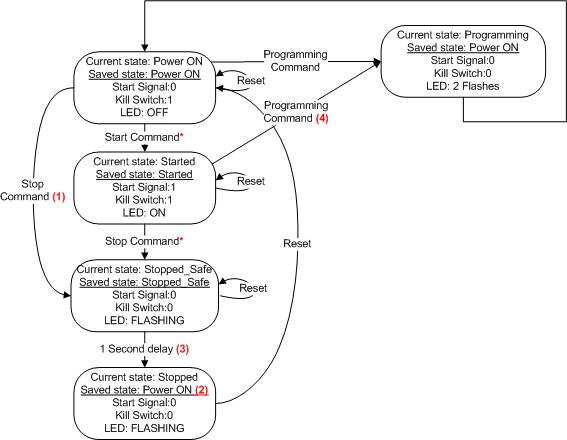
I've implemented that with my own IR Receiver and Arduino IDE, according to Modes Of Operation:


So here is a code example, how to implement it.
UPDATE: 2014.04.04 after RobotChallenge 2014

//IR control PINs
#define RECV ## //Your pin number instead '##'
#define LED ##

//LIMIT COMMAND VALUES
#define MinimumCommandValue 0xC4
#define MaximumCommandValue 0xFE
#define UnderMinimumCommandValue 0x00 ... 0xC3
#define OverMaximumCommandValue 0xFF

//EEPROM ADDRESS
#define StateAddress   0
#define CommandAddress 1

//EEPROM StateValues
#define POWERON 0
#define STARTED 1
#define STOPPED 2
//OVERALL NUMBER OF STATES
#define NumOfStates 2

//THE LIBRARIES YOU NEED
#include <IRLib.h>
#include <EEPROM.h>

//THE STATES YOU NEED TO DECLARE
State powerOnState    = State(powerOnEnter, powerOnUpdate, powerOnExit);
State idleRunState    = State(idleRunUpdate);
State stoppedState    = State(stoppedSafe,stoppedUpdate, NULL);
/*MORE OF YOUR STATES HERE*/

//THE STATE YOU START FROM
FiniteStateMachine stateMachine = FiniteStateMachine(powerOnState);

//VARIABLES
int STOP, STOP2,  START, START2;
byte StateValue, CommandValue;

//INIT IR RECEIVER
IRrecv My_Receiver(RECV);
IRdecode My_Decoder;

void setup(){
/*PUT ALL YOUR SETUPS*/
  pinMode(LED, OUTPUT);
  pinMode(RECV,  INPUT);
//RESTORE THE PROGRAMMED COMMAND VALUE FROM EEPROM
//RESTORE THE STATE VALUE AFTER UNPREDICTED TURN OFF
  RestoreCommandStateValues();
  My_Receiver.enableIRIn();
//RETURN TO THE RESTORED STATE
  ReturnToCurrentState();
}

void loop() {
  check_irrecv_signal();
/*YOUR ESSENTIAL FUNCTIONS*/
  stateMachine.update();

}

void check_irrecv_signal(){
  if (My_Receiver.GetResults(&My_Decoder)) {
    My_Decoder.decode();
//ACCORDING TO THE STATE, CHOOSE COMMANDS
    switch(StateValue){
      case POWERON:
        if(My_Decoder.value == START || My_Decoder.value == START2){
           startCommand();
         }                  
         remoteStopProgramCommands(); break;
      case STARTED: remoteStopProgramCommands(); break;
      case STOPPED: break;
    }
    My_Receiver.resume();      //Prepare to receive the next value 
  }
}

void remoteStopProgramCommands(){
  if(My_Decoder.value == STOP || My_Decoder.value == STOP2) stopCommand(); //Cannot use in switch because STOP is not a constant
  switch(My_Decoder.value){
//THESE ARE POSSIBLE PROGRAMM COMMAND VALUES
    case 0x12C4 ... 0x12FE:
    case 0x1AC4 ... 0x1AFE: programmCommand(); break;
  }
}

void RestoreCommandStateValues(){
  CommandValue = EEPROM.read(CommandAddress);
  switch(CommandValue){
    case UnderMinimumCommandValue:
    case OverMaximumCommandValue:
      CommandValue = MinimumCommandValue;
      EEPROM.write(CommandAddress, CommandValue);
      break;
  }
  makeStartStopValues();
  StateValue = EEPROM.read(StateAddress);
  if(StateValue > NumOfStates){
    StateValue = POWERON;
    EEPROM.write(StateAddress, StateValue);
  }

}

void makeStartStopValues(){
//ACCORDING TO NEW SWEDEN IR REMOTE YOU MAY
//GET 2 DIFFERENT VALUES AT THE SAME BUTTON
//BUT DIFFERENT PUSH TIMES
  STOP = CommandValue + 0x1100;
  STOP2 = CommandValue + 0x1900;
  START = STOP + 1;
  START2 = STOP2 + 1;
}

void ReturnToCurrentState(){
  switch(StateValue){
    case POWERON: break;
    case STARTED: startCommand(); break;
    case STOPPED: stopCommand(); break;
  }
}

void startCommand(){
  StateValue = STARTED;
  EEPROM.write(StateAddress, StateValue);
/*ENABLE DRIVERS HERE*/
  digitalWrite(RXLED, HIGH);
  stateMachine.transitionTo(idleRunState);
}

void stopCommand(){
/*DISABLE DRIVERS HERE*/
  StateValue = STOPPED;
  EEPROM.write(StateAddress, StateValue);
  stateMachine.transitionTo(stoppedState);
}

void programmCommand(){
/*DISABLE DRIVERS HERE*/
  StateValue = POWERON;
  EEPROM.write(StateAddress, StateValue);
  CommandValue = My_Decoder.value & 0x00FE;
  EEPROM.write(CommandAddress, CommandValue);
  makeStartStopValues();
//FLASH THE LED 2 TIMES 500MS
  LED_FLASHING(2, 500);
  stateMachine.transitionTo(powerOnState);
}

/*POWER ON STATE*/ 
void powerOnEnter(){
/*YOUR CODE HERE*/
}
void powerOnUpdate(){
/*YOUR CODE HERE*/
}  
void powerOnExit(){
/*YOUR CODE HERE*/
}

/*IDLE RUN STATE*/  
void idleRunUpdate(){
/*YOUR CODE HERE*/
}

/*STOPPED_SAFE STATE*/
void stoppedSafe(){
  LED_FLASHING(4, 250);
  StateValue = POWERON;
  EEPROM.write(StateAddress, StateValue);
}
/*STOPPED STATE*/
void stoppedUpdate(){
  while(1){
    LED_FLASHING(5, 500);
  }
}

1.31.2013

A-Silicone or PU Tires?

Tested polyurethane rubber with the surface of the dohyo, with 32-07 Monitor/Slip and Friction from Testing Machines Inc.
Introduction:
Slip and Friction testing aids in the evaluation of chemicals and additives used to create or minimize the degree of friction between two contacting test specimens.

Applications:
Paper, Flexible Packaging, Foils, Rubber, Plastics, Wood,
Linoleum, Metal, Printing, Coatings, Composites

Specifications:

  • Selectable speed from 5 to 43 cm/min (2 to 17 inch/min)
  • Selectable travel distance from 2.5 to 30.5 cm (1 to 12 in.)
  • Meets TAPPI T816, T549, and ASTM D1894

Features:

  • Digital display, storage and editing of up to 100 readings, and selectable units (COF or grams)
  • Settable limits
  • Statistics-average, standard deviation, high/low results.
  • Report printout with built in printer
  • RS-232
  • Static and kinetic coefficient of friction calculated in one operation.
  • Direct drive arm with unique skid control.
  • Sled-connecting mechanism ensures level pulling action.
  • Easily interchangeable sleds.
  • Full color easy to read Display

Instrument size:
Depth: 495 mm (19.5 in.)
Height: 508 mm (20 in.)
Width: 515 mm (20.3 in.)
Weight 25 kg (55 lb)
PDF product sheet:
Monitor/Slip and Friction

Product Video:

Brief test results:
* TEST REPORT *
Test Name: SL
Date: 31 Jan 2013

Sample ID: -
Sled Type: B - 200g (.44Lb)
Sled Info: -
Speed: 10cm/min
Travel: 20cm
Unit: COF

Total Meas.: 3
Rejected: 0
Static:
 -> Mean: .654
 -> SD: .089
 -> Lo: .601 (#1)
 -> Hi: .758 (#2)
Kinetic:

 -> Mean: 1.536
 -> SD: .210
 -> Lo: 1.410 (#1)
 -> Hi: 1.780 (#2)

Reading #: S K (X=reject)
 1: .601 1.410
 2: .758 1.780
 3: .604 1.420

* END *

Conclusion:
Graph bellow is found from motor parameters, by ramming the robot to the wall.
  1. As expected, static is lower than kinetic friction coefficient.
  2. These aren't final results, because 3 measurements at one speed means nothing.
  3. It is essential to conduct full experiment at different speeds and normal loads, in order to achieve force vs speed load graph and compare with DC motor load graph.
  4. Next: Full experiment conduction with PU and silicone rubbers.


Useful links:

1.30.2013

Rotor Inertia Measurement

How do we measure rotor inertia?
We can calculate it out of free run.

Method:
  • Connect motor to the battery;
  • Measure no-load current;
  • Connect oscilloscope to the terminals;
  • Disconnect the battery;
  • Let the single measurement appear in the oscilloscope.

Results:
We measured free run BEMF dynamic process, which is equivalent for speed.
We can approximate the achieved graph to linear, which will allow us to use approximated differential dynamics:
  1. Main dynamic formula (M_din - dynamic torque, M_t.v. - no load torque).
  2. Useful torque.
  3. Dynamic Torque equal to No Load Torque.
  4. Torque and current link.
  5. EMF and angular velocity link.
  6. Voltage balance equation.
Moment of inertia is equal to:

Where I_t.v. - no load current, k - motor constant, T - time, E_bat - battery EMF, r_a - armature resistance, r_bat - battery resistance.

Simulation:
Simscape electrical in Matlab, helps us to have this approximated dynamic process and calculate the rotor inertia, which is equal to 1,081e-4 kgm^2:
Conclusion:
This is quite accurate method for rotor inertia calculation, if the gearmotor has static load (friction), which linearised the exponential graph of the speed.

Cast Silicone Tires

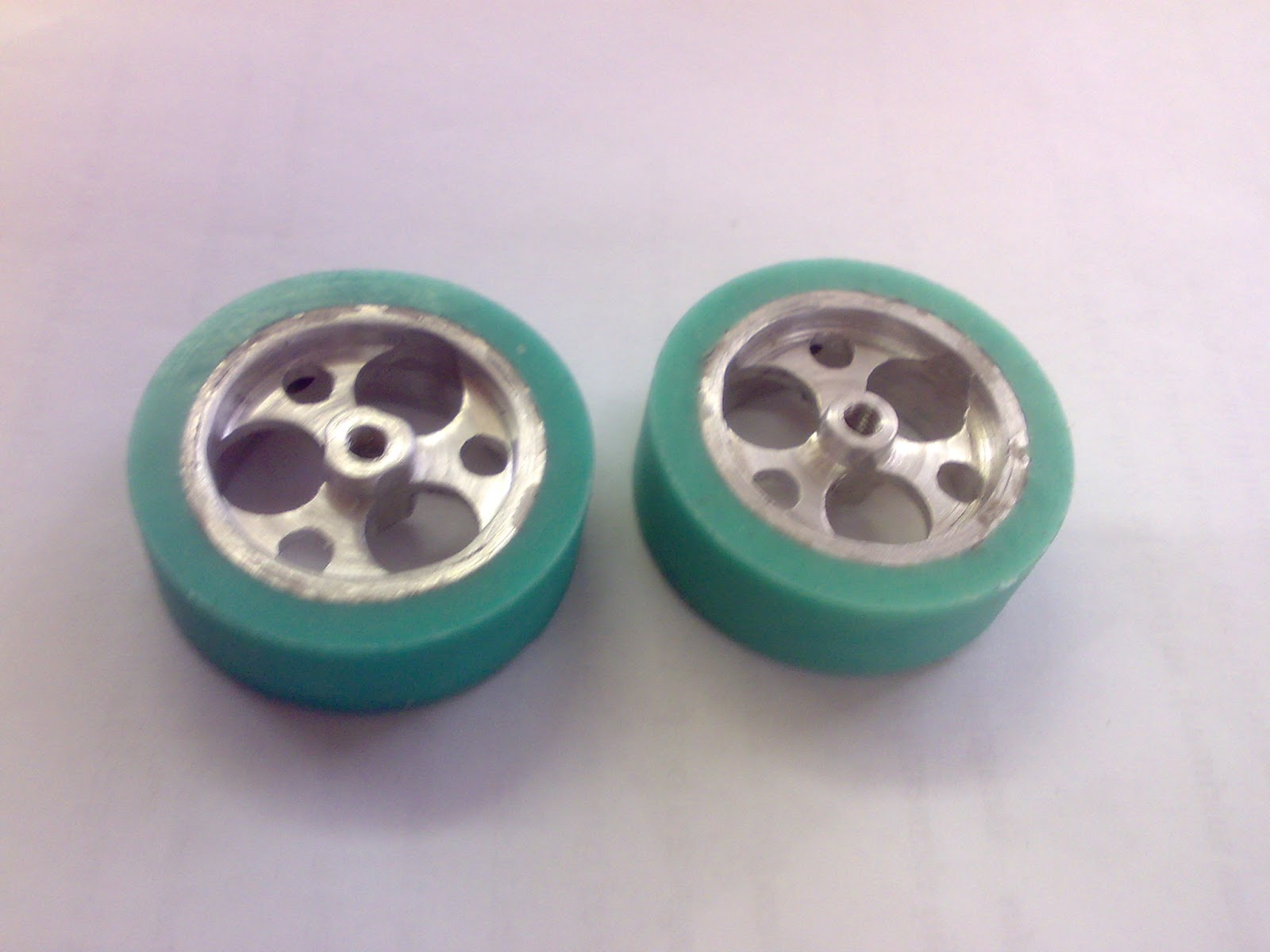
Casted new tires with Elite Double 22 from Zhermack

A-Silicone for laboratory model duplication. Ideal for duplicating models with slight undercuts and casting investments. Use of a plastic duplication flask is recommended. Available in light green for better definition of detail.

Advantages:
  • Mixing facilitated by the 1:1 base to catalyst ratio;
  • High fluidity: does not require mixing in a vacuum;
  • Absolute precision for faithful reproduction of detail;
  • Dimensional stability over time and non-deformability, allowing a number of duplications to be made;
  • Compatible with all plasters, polyurethane resins, phosphate investments and acrylic resins.

Characteristics:
  • Extreme fluidity;
  • Versatile, thanks to the 22 Shore A hardness;
  • Light green colour.

DOWNLOAD:
Center the rims in the form, and apply the mixed liquid to the gap. Polimerisation shouldn't take long, about half an hour. In the result we get newly casted tyres with perfect friction (while new).


1.04.2013

Block Diagram


Electrical energy source ES feeds programable logic controller together with the voltage feedback. Electrical energy flows to both drivers D, which are controlled with PLC and regulate the power for the motors M, where the energy is converted to mechanical. Both motors drive a single transmission device TD, which is actually a full robot mechanical system, except motors, and a Dohyo together, energy parameters are transformed to fit the work unit WU, wich is an opponents robot system and a Dohyo ring too.
The force you need to push the opponent have to be bigger than critical friction force of the opponent's wheels and the Dohyo surface.

Conclusion:
You don't need an enormous power for motors, only slightly bigger than the product of critical friction force of your TD and prefered nominal speed (e. 10cm/s, depends on termal ability, should not overheat).

12.26.2012

SolidWorks Drawings Update

This documentation is required for my cource work. I use SolidWorks Drawings, user friendly environment and fast view creation, drawings made in no time.
The file is in CAD design section. 2012.12.‎31, ‏‎20:43:38

12.15.2012

Acceleration

When I first tried to launch this robot, I've set the full speed to have a good show.
But I've noticed that the front had been raised significantly at full thrust.
If my robots front is raised each attack state, he's dead from the start.

It needs a Soft Start, maximum acceleration allowed to drive the platform.

Recently I've been playing to solve that problem.
Robot has tactile surface sensors - micro switches, which deactivate if the front is raised.

With the help of MegunoLink Tool, Analog reading, Serial communication and code adjustment, we can make an experiment. The Report is bellow.

My course project asks for 20:1 speed regulation range, so speed is 5% steps discrete.
A delay between steps is adjusted.

Adjustment results:
  • Full thrust: No Soft Start applied, as you already noticed that the front has raised, Switch1 readings shows that 0 value, which is OFF. 270ms flying.
  • 1 ms between steps: Not enough yet, 237ms flying.
  • 2ms between steps: 220ms flying blade.
  • 3 ms between steps: 193ms flying blade
  • 4 ms between steps: 159ms max flying blade, unstable yet.
  • 5ms between steps: Eureka the Golden middle! No flying blades.
Conclusion:
It might be better to add a millisecond as 20% more in reserve, because the dead zone for switches is 2mm (~0.1") between flying blade and surface. Rate of voltage change should be 92.5~111 V/s, provides a Soft Start for motors.

Update 2013.01.03: Another more accurate way to find out if the blade is being raised:
  1. Place a sheet of standard A4 paper on the surface of Dohyo in front of the vehicle;
  2. Soft start it to full speed;
  3. Do it several times;
  4. If the blade gets on top of the paper, that means it is still being raised, add a millisecond or two between 5% PWM duty cycle steps.
  5. If the paper is being pushed only, configuration is over and you're good to go.